
松垮垮 松垮垮
首页
  • GPU并行编程
  • 图形学
  • 归并算法
  • 计算机视觉
  • css
  • html
  • JavaScript
  • vue
  • 压缩命令
  • cmdline
  • Docker
  • ftrace跟踪技术
  • gcov代码覆盖率测试
  • GDB
  • git
  • kgdb
  • linux操作
  • markdown
  • systemtap
  • valgrind
  • 设计模式
  • 分布式
  • 操作系统
  • 数据库
  • 服务器
  • 网络
  • C++
  • c语言
  • go
  • JSON
  • Makefile
  • matlab
  • OpenGL
  • python
  • shell
  • 正则表达式
  • 汇编
  • GPU并行编程
  • mysql
  • nginx
  • redis
  • 网络
  • 计算机视觉
  • 进程管理
  • linux调试
  • 【Python】:re.error bad escape i at position 4
  • 搭建ai知识助手
  • 分类
  • 标签
  • 归档
GitHub (opens new window)

松垮垮

c++后端开发工程师
首页
  • GPU并行编程
  • 图形学
  • 归并算法
  • 计算机视觉
  • css
  • html
  • JavaScript
  • vue
  • 压缩命令
  • cmdline
  • Docker
  • ftrace跟踪技术
  • gcov代码覆盖率测试
  • GDB
  • git
  • kgdb
  • linux操作
  • markdown
  • systemtap
  • valgrind
  • 设计模式
  • 分布式
  • 操作系统
  • 数据库
  • 服务器
  • 网络
  • C++
  • c语言
  • go
  • JSON
  • Makefile
  • matlab
  • OpenGL
  • python
  • shell
  • 正则表达式
  • 汇编
  • GPU并行编程
  • mysql
  • nginx
  • redis
  • 网络
  • 计算机视觉
  • 进程管理
  • linux调试
  • 【Python】:re.error bad escape i at position 4
  • 搭建ai知识助手
  • 分类
  • 标签
  • 归档
GitHub (opens new window)
  • 分布式

  • 操作系统

  • 数据库

  • 服务器开发

    • nginx
    • nginx环境+编译+调试
    • 高性能linux服务器
  • 网络编程

  • 系统
  • 服务器开发
songkuakua
2025-02-15

nginx环境+编译+调试

# nginx环境:

nginx编译+配置环境 (opens new window)

# 下载
wget http://nginx.org/download/nginx-1.24.0.tar.gz
# 解压
tar -zxvf nginx-1.24.0.tar.gz
# 进入到源码目录
cd nginx-1.24.0/
cp -r contrib/vim/* ~/.vim # vim工具,高亮配置文件


# 查看configure 支持的参数,其中包含指定某些路径、开启某些模块、编译中特殊参数
#./configure --help | more
# 安装nginx必备依赖库
yum -y install gcc pcre pcre-devel zlib zlib-devel openssl openssl-devel
# 进行编译,指定安装目录,没什么报错就是编译成功
./configure --prefix=/nginx  --with-debug
make 
make install 
1
2
3
4
5
6
7
8
9
10
11
12
13
14
15
16
17

yum install -y pcre pcre-devel

yum install -y zlib zlib-devel

yum install -y openssl openssl-devel

yum install gcc-c++

yum -y install lua*
1

yum install -y wget

[nginx编译报错src/core/ngx_murmurhash.c:37:11: 错误:this statement may fall through -Werror=implicit-fallthrough=] h ^= data[2] (opens new window)

解决/usr/local/nginx/sbin/nginx: error while loading shared libraries: libluajit-5.1.so.2: cannot open

/usr/local/nginx/sbin/nginx: error while loading shared libraries: libluajit-5.1.so.2: cannot open_./nginx: error while loading shared libraries: lib-CSDN博客 (opens new window)

解决无法找到struct crypt_data定义

nginx ‘struct crypt_data’没有名为‘current_salt’的成员 (opens new window)

解决无法找到共享库**libpcre.so.1**

error while loading shared libraries: libluajit-5.1.so.2: cannot open shared 解决办法-CSDN博客 (opens new window)

# 调试

  • gdb关联进程调试时出现ptrace: Operation not permitted.
# 设置容器的privileged权限
docker exec --privileged -it build-pg /bin/bash 
# 设置允许非PTRACE权限的进程使用ptrace系统调用来追踪其他进程
echo 0 > /proc/sys/kernel/yama/ptrace_scope # 系统和容器的值都要修改
1
2
3
4
  • ./configure --prefix=/nginx --with-debug

./objs/Makefile 下修改 增加-g (不确定是否需要) image-20240426180230877
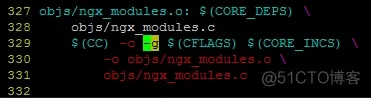
ps -ef | grep nginx 查看工作线程和主线程(e为显示所有进程,f为全格式显示)

  • 为了方便调试,关闭主线程,只有一个工作线程

vim [nginx的安装目录]/conf/nginx.conf

添加master_process off; # 关闭主线程,只有一个工作线程

添加daemon off # 关闭守护进程,前台工作

  • b ngx_event.c:ngx_process_events_and_timers

nginx调试参考文档 (opens new window)

上次更新: 2025/02/21, 14:57:10
nginx
高性能linux服务器

← nginx 高性能linux服务器→

最近更新
01
搭建ai知识助手
02-23
02
边缘检测
02-15
03
css
02-15
更多文章>
Theme by Vdoing | Copyright © 2025-2025 松垮垮 | MIT License | 蜀ICP备2025120453号 | 川公网安备51011202000997号
  • 跟随系统
  • 浅色模式
  • 深色模式
  • 纯净模式